
Every L&D, HR and compliance team evaluating a learning platform eventually runs into the same false choice.
You can have something simple — quick to launch, easy for your team to run — but it’ll be light on the enterprise features you actually need: security, integrations, scale, audit-ready reporting. Or you can have something powerful — genuinely enterprise-grade — but you’ll pay for it in a six-month implementation, a steep learning curve, and a dependency on IT and consultants you can never quite shake.
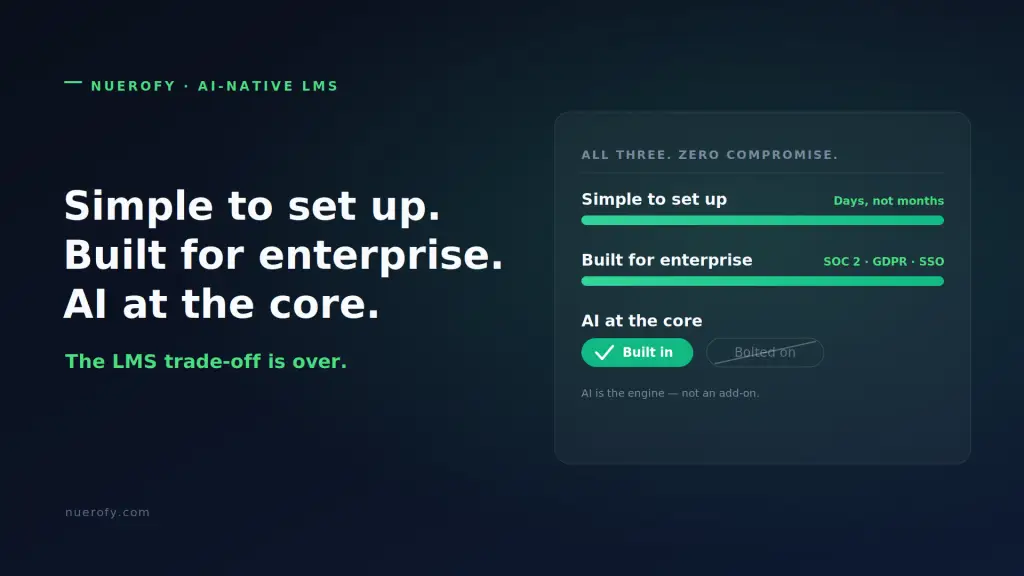
For years that trade-off was real. It isn’t anymore. This article walks through the specific problems that trade-off creates — and how a modern, AI-native platform solves each one without forcing you to pick a side.
Problem 1: Implementations that take months, not days
The classic enterprise LMS is notorious for slow rollouts. Industry guides routinely cite three-to-six-month implementation cycles for legacy platforms — months of configuration, content migration, integration work and admin training before a single learner logs in. For a team that needs compliance training live now, that’s not a project plan. It’s a problem.
The fix: Setup measured in days, not quarters. With a platform designed for self-service, most organisations can be running real training within 72 hours — using a library of ready-made, accredited courses to deploy instantly, then layering in their own content as they go. No professional services engagement required to switch the lights on.
The test to apply: ask any vendor exactly how long until your first learner completes a real course. If the honest answer is “a few months,” you’ve found the trade-off you’re trying to avoid.
Problem 2: AI that’s bolted on, not built in
This is the one that catches teams out. “AI-powered” is now on every vendor’s homepage — but there’s a world of difference between AI that’s built in and AI that’s bolted on.
Bolted-on AI is a chatbot widget or a “summarise” button grafted onto a platform whose underlying architecture was designed in 2012. It’s a feature, sitting on the surface. It can answer a question or generate a paragraph, but it doesn’t change how the platform actually works. You still build courses the old way, still pull reports the old way, still personalise nothing.
AI at the core is different. It’s the engine, not an accessory. That means:
- You upload a policy, a PDF or a slide deck, and the platform builds the course — structure, interactions, assessments, voiceover and translations — in minutes.
- A placement test reads each learner’s existing knowledge and routes them around what they already know, instead of marching everyone through the same modules.
- You ask your data a question in plain English — “which sites are behind on fire-safety training?” — and get an answer and a chart back, instead of exporting a spreadsheet and building it yourself.
The difference shows up in your day-to-day: bolted-on AI saves you a few clicks; AI at the core removes whole categories of work. When you’re evaluating platforms, push past the demo’s shiniest feature and ask what the AI can’t do if you turn it off. If the answer is “not much changes,” it was bolted on.
Problem 3: “Simple” tools that collapse under enterprise demands
The flip side of the trade-off is just as painful. Plenty of lightweight tools are genuinely easy to use — right up until you ask them to do enterprise work. Then the gaps appear: no single sign-on, shaky security posture, no real audit trail, no way to manage thousands of users across multiple sites, no integration with the HR system that holds your source of truth.
The fix: Enterprise capability shouldn’t be the thing you sacrifice for ease. A modern platform can be simple to operate and carry the full enterprise toolkit underneath:
- Security and compliance that stands up to scrutiny — GDPR compliance, SOC 2 Type II auditing, and encryption in transit, so your data team signs off without a fight.
- Integrations with your existing HRIS, LMS and third-party tools, so user data syncs and learning slots into the workflows you already run.
- Scale that spans a small team to a multi-site, multi-language workforce — including contractors and external partners — without re-platforming.
- Audit-ready reporting and certification tracking that turn “prove it” from a fire drill into a dashboard.
Ease of use and enterprise depth are not opposites. The old platforms simply made them feel that way because their depth came wrapped in complexity.
Problem 4: Admin that eats the team alive
Even after launch, the legacy model keeps taxing you. Manual enrolments, chasing completions, rebuilding the same reports each month, fielding the same HR and policy questions over and over. L&D and HR teams routinely lose a huge share of their week to administration that produces no learning at all.
The fix: Let the platform absorb the repetitive work. Automated enrolment and reminders, auto-generated compliance reports, live alerts on deadlines and completions, and an always-on assistant that answers routine learner and policy questions instantly. Teams that automate this consistently report admin time falling by well over half — time that goes back into actual programme design instead of spreadsheet maintenance.
Problem 5: Enterprise pricing that prices out everyone but enterprises
There’s a quieter problem buried in the trade-off: the most capable platforms have historically been built — and priced — for very large organisations, often with minimum user counts and five-figure starting points that put them out of reach for mid-sized teams. “Enterprise-grade” became a synonym for “expensive and only worth it at scale.”
The fix: Transparent, per-user pricing with no artificial minimums means a 50-person team and a 50,000-person enterprise can run the same capable platform — each paying for what they use. When you compare options, look past the headline and check three things: the per-user cost at your actual size, whether there’s a minimum user requirement, and what’s genuinely included versus sold as a paid add-on. Those three numbers usually tell you more than the feature grid.
A short buyer’s checklist
If you take nothing else from this, take these questions to your next vendor demo:
- Time to first real completion — days or months?
- AI test — what stops working if you switch the AI off? (Core vs. bolted-on.)
- Security — GDPR, SOC 2 Type II, SSO: in or extra?
- Integration — does it connect to your HRIS out of the box?
- Pricing — per-user cost at your size, and any minimum seat count?
- Admin — how much of enrolment, reminders and reporting is automated?
The right platform answers all six without flinching. The trade-off persists only with vendors who need you to accept it.
The research and the reality
The “you must choose simple or powerful” assumption is a hangover from the legacy-LMS era, when enterprise capability genuinely required heavy configuration and long implementations — independent guides still put those legacy rollouts at three to six months. What’s changed is the architecture: when AI sits at the centre of an LMS/LXP platform rather than on top of it, the work that used to demand specialists and quarters of setup — building courses, personalising paths, generating reports — collapses into minutes. Fast setup and deep capability stop being opposites.
Where Nuerofy fits
Nuerofy was built for exactly this: simple enough that most organisations launch within days, with enterprise features — GDPR and SOC 2 Type II security, HRIS and third-party integrations, multi-site and multilingual scale, accredited content and audit-ready reporting — already in the box. And the AI isn’t a bolt-on: it’s the engine that turns your documents into courses, adapts learning to each person, and answers your data in plain English. All at transparent per-user pricing, with no minimum seat counts that lock out smaller teams.
If you’ve been told you have to choose between easy and enterprise, that’s the trade-off we built Nuerofy to end.
If you are weighing the leading AI-native options directly, our Sana alternative comparison sets out where the two platforms differ on pricing, included content and compliance depth.
See how fast you could be up and running → Start a free trial or book a demo