
The Training Matrix: How to Build One, a Free Template, and the Moment to Retire It
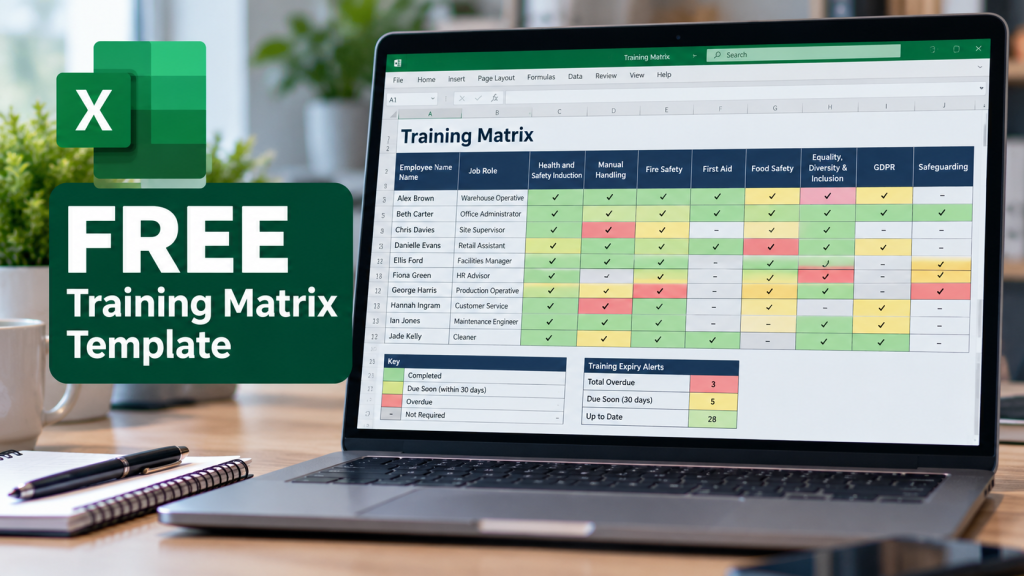
A training matrix is a single grid that answers the question every inspector, auditor and operations director eventually asks: who is trained in what, and is it current? Employees run down the rows, training subjects run across the columns, and each cell records the status of that person against that course, typically a completion or expiry date. It is the simplest compliance tool in workforce management, it is usually built in Excel, and when it is accurate it is genuinely powerful: one page that shows the fire marshal cover for every site, the first aiders whose certificates lapse next month, and the new starter who has not yet done manual handling.
This guide covers the whole life of a training matrix: what it is and is not, how to build a good one, a free template you can download and use today, and the part most guides skip, which is the predictable point at which every spreadsheet matrix stops being true and what to do then.
Training matrix or skills matrix? The distinction that matters
The two terms get used interchangeably and they should not be. A training matrix tracks completion of defined training against requirements: mandatory courses, certificates, renewal dates. Its question is compliance: is this person’s training current? A skills matrix maps capability levels, often scored one to five, against the skills a team needs. Its question is capacity: who can do this, and how well? Most organisations need the training matrix first, because it carries the legal load: it is the document that evidences your training position when the HSE, the CQC, an EHO or an insurer asks. This guide, and our template, focus on the training matrix, though the structure adapts to skills scoring easily.
How to build a training matrix in six steps
- List your people down the rows, with role, department and site columns beside the names, because those are the filters you will actually use when someone asks “is everyone on nights at the Leeds site fire-trained?”
- List your training requirements across the columns, starting with the legal core (fire safety, manual handling, first aid cover, plus your sector’s own: food hygiene, safeguarding, COSHH) before any nice-to-haves.
- Decide what a cell records. Expiry date beats completion date, and both beat a tick, because a tick cannot tell you the training lapsed last March. Our template records expiry dates and colour-codes them automatically.
- Map each course to its renewal cycle, which is where most matrices quietly go wrong; the legal and accepted cycles for every major UK course are set out in our guide to training renewal periods, and the template includes a pre-filled course key based on it.
- Make status visible at a glance with red, amber and green: expired, expiring within 30 days, current. If the matrix needs reading rather than glancing, it will not be used.
- Name an owner and a review rhythm, weekly at minimum, because an unowned matrix is a historical document within a month. Follow those six steps and you will have a matrix that genuinely works, for a while, for a workforce of a certain size. Both caveats matter, as we will come to.
Download the free template
Our free training matrix template does the above for you: employees down the rows with role, department and site filters; the common mandatory courses across the columns, editable to your estate; expiry-date cells that turn red when lapsed and amber within 30 days of renewal, automatically against today’s date; a next-expiry countdown per person; and a course key pre-filled with typical UK renewal cycles. It is unbranded inside, uses no macros, and works in Excel and Google Sheets.
Download the free training matrix template (Excel)
No email gate, no catch. Swap in your people and your courses and it will tell you your compliance position by this afternoon.
Is a training matrix a legal requirement?
No law names the document, but the obligation it evidences is real: health and safety law requires employers to provide adequate training and, in practice, to be able to demonstrate it, and sector regulators from the CQC to environmental health expect training records that are current, individual and producible. A matrix is simply the minimum viable way of holding that evidence in one place. What inspectors and tribunals actually examine is the layer beneath it: per-person completion records with dates and assessment outcomes. The matrix summarises; the records prove. Keep both, and keep them agreeing with each other, which brings us to the problem.
Where every spreadsheet matrix breaks
Spreadsheet matrices do not fail dramatically; they drift. The maths is unforgiving: fifty staff against twelve subjects is six hundred cells, each with its own renewal clock, fed by course completions the spreadsheet cannot see, maintained by one owner with another job. Every new starter, leaver, role change and refresher is a manual edit, and every missed edit is a cell that is now quietly wrong. Then the file forks: a site manager saves a local copy, HR emails “the latest version”, and within a quarter there are three matrices disagreeing about who is fire-trained. The failure surfaces at the worst moment, in an audit, an incident investigation or an insurance claim, when the document meant to prove compliance instead proves that nobody was sure. None of this is the owner’s fault. Past a certain scale, a manually maintained matrix is mathematically guaranteed to be wrong somewhere; the only question is where, and whether you find out before an inspector does.
The living matrix: what replaces the spreadsheet
The fix is not a better spreadsheet; it is removing the manual link between training happening and the matrix knowing. On modern training matrix software, the matrix is not a document anyone maintains but a live view the system generates: a course completed on a phone at 2am updates the grid at 2am; renewal cycles trigger automatic re-assignment and 30, 14 and 7-day alerts instead of waiting for the owner’s weekly scan; new starters inherit their role’s requirements the day they join; and the “cell” behind every green square is a timestamped, assessed completion record, exportable per named individual in under a minute. The 200+ accredited courses in our Learning Library carry their renewal cycles built in, so the matrix’s hardest column maintains itself. The template above is genuinely useful, and for a small, stable team it may be all you need. The honest advice is to use it until the week keeping it accurate becomes a job, and to notice when that week arrives.
If your matrix has already reached that point, book a demo and bring it with you: we will show you the same workforce as a live matrix that updates itself.
Frequently asked questions
What is a training matrix? A grid that records each employee’s status against each required training subject, typically with expiry dates, so an organisation can see at a glance who is trained, what is current and what is due. It is the standard summary tool for evidencing workforce training compliance.
What is the difference between a training matrix and a skills matrix? A training matrix tracks completion and currency of defined training against requirements, answering a compliance question. A skills matrix scores capability levels against the skills a team needs, answering a capacity and development question. Organisations with legal training obligations need the training matrix first.
What should a training matrix include? People with role, department and site; the required courses, legal core first; expiry dates rather than ticks; colour-coded status against today’s date; each course’s renewal cycle; and a named owner with a review rhythm. Underneath it, keep the per-person completion records the matrix summarises.
Is a training matrix a legal requirement in the UK? The document itself is not named in law, but employers must be able to demonstrate adequate, current training, and regulators expect producible individual records. A matrix is the minimum practical way to manage that evidence; detailed completion records remain the proof.
How often should a training matrix be updated? Continuously in principle, weekly at an absolute minimum in a manual spreadsheet, and the update burden grows with headcount, turnover and course count. Automated systems remove the question by updating the matrix the moment training is completed or falls due.
When should you move from a spreadsheet matrix to software? When keeping the spreadsheet true becomes a recurring job: typically past roughly fifty people, multiple sites, or any environment with regular turnover. The warning signs are version forks, lapsed renewals discovered late, and audit preparation taking days, all of which indicate the matrix no longer reflects reality between updates.